HTML & CSS Tutorial

      No Comments on HTML & CSS Tutorial


HTML & CSS Tutorial | Total-QA


HTML & CSS Tutorial for Beginners

1. Introduction to HTML

HTML (HyperText Markup Language) is used to structure a webpage using tags.

2. HTML Elements & Attributes

Elements are building blocks, attributes provide extra info.

3. Introduction to CSS

CSS (Cascading Style Sheets) is used to style HTML elements.

4. CSS Selectors

5. CSS Box Model

6. CSS Layouts (Flexbox & Grid)

Flexbox Example:

Grid Example:

7. Practical Example with Live Editor

Try editing the HTML below and click Run Code to see output:


8. Responsive Design

Use media queries to make your site mobile-friendly.

9. Next Steps

  • Create multiple pages for different topics (Java, Python, Tools).
  • Add interactive tools like Online Java Editor, Age Calculator.
  • Place AdSense ads strategically for revenue.
  • Promote tutorials on social media & programming forums.


Postman MCQ’s with Answers & Explanations

1. What is Postman primarily used for?


2. Which HTTP method is used in Postman to retrieve data?


3. What does status code 404 indicate in Postman?


4. Which content type is typically used to send JSON data in the body of a POST request?


5. How can you save dynamic data from a response in Postman?


6. Which of the following is used to write tests in Postman?


7. How can you chain requests in Postman (i.e., use response of one in another)?


8. What does the 200 HTTP status code mean in Postman?


9. Which of the following is a correct way to set an environment variable from a test script?


10. What is the purpose of using Newman with Postman?


Static Nested Inner class in Java|Interview Question| Selenium WebDriver


Nested classes are divided into two categories: static and non-static. Nested classes that are declared static are called static nested classes. Non-static nested classes are called inner classes.Inner Class in JAVA is a class embedded inside a another Class which is called as outer class. It is also called as Nested Class. Inner class is not accessible from outer class. It is required to create an object of the inner class in outer class.
Advantage:
The inner class can access the methods and variables of the outer class without creating objects of outer class.


Static Inner Class in JAVA:
An inner class can be declared as static, in which we can access the inner class from outer class without creating an object of the outer class.

Advantage:
The purpose of the static inner class makes the code more readable and easily under-stable.

ById is an static nested inner class in By Class

Conclusion:
static nested inner classes are mainly useful for more readability.

Modular Driven Framework in Selenium WebDriver | Real Time Examples |Step by Step Explanation


Modular Driven Framework is the approach where all the test cases are first analyzed to find out the reusable flows. Then while scripting, all these reusable flows are created as functions and stored in external files and called in the test scripts wherever required.

Advantages:
Modular division of scripts leads to easier maintenance and also the scalability of the automated test Scripts are independent to write.

Disadvantages:
Since data is still hard-coded in the script, the same test case cannot be run for multiple data values without changing data after each run.
Additional time is spent in analyzing the test cases to identify with reusable flows.
Good programming knowledge is required to create and maintain function libraries.

Real Time Examples:
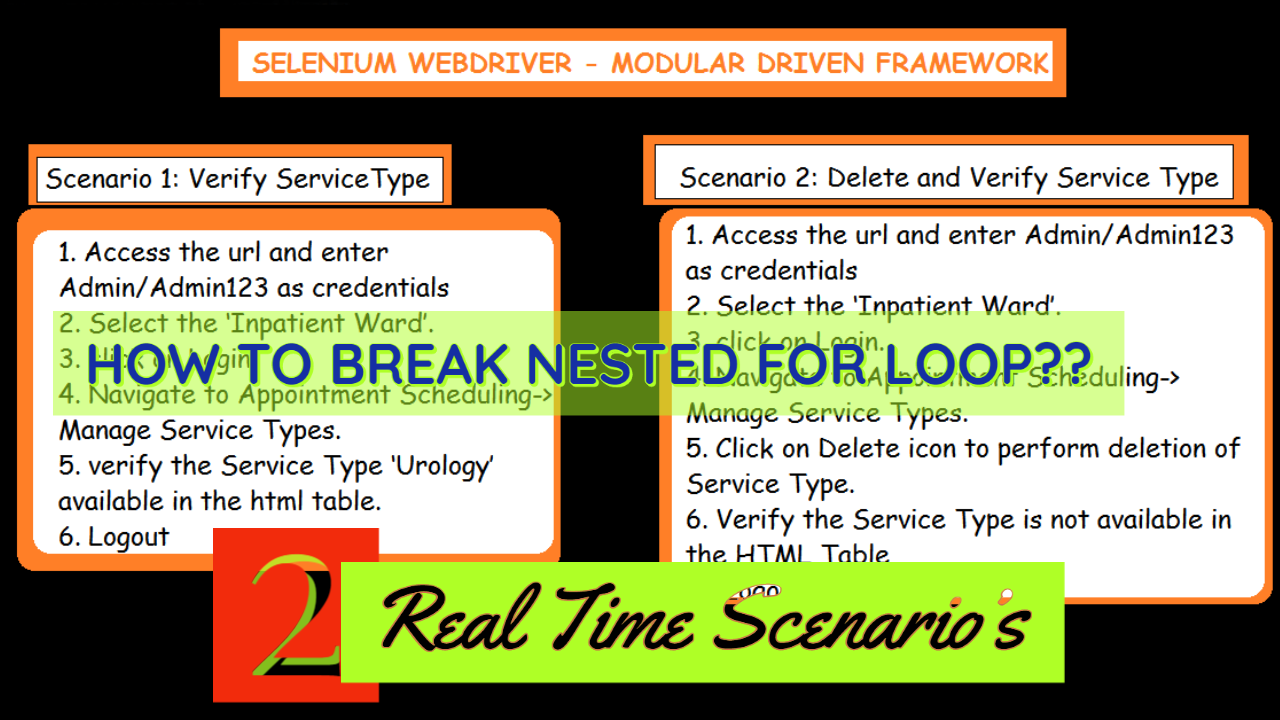
Scenario 1 :
Verify the Service Type is available in the HTML table
1. Access the URL and enter Admin/Admin123 as credentials
2. Select the ‘Inpatient Ward’.
3. click on Login.
4. Navigate to Appointment Scheduling->Manage Service Types.
5. verify the Service Type ‘Urology’ available in the html table.
6. Logout

Scenario 2 :
Delete the Service Type from the HTML Table and Verify the Service Type is not available in the HTML Table
1. Access the url and enter Admin/Admin123 as credentials
2. Select the ‘Inpatient Ward’.
3. click on Login.
4. Navigate to Appointment Scheduling->Manage Service Types.
5. Click on Delete icon to perform deletion of Service Type.
6. Verify the Service Type is not available in the HTML Table
7 . Logout

ModularDrivenFramework

ModularDrivenFramework


Conclusion:
Using the Logic mentioned above helps to implement the Modular Driven Framework successfully in your projects.
Let us know if you have any queries in implementing this framework.
Drop an email to totalqa9@gmail.com

Thanks for the @Guest Author :
Nithya Kalyani
Email ID : Nithyakalyanigovindarajan@gmail.com

Selenium WebDriver, Keyword Driven Framework Design Architecture ,XLSX,Reflection API


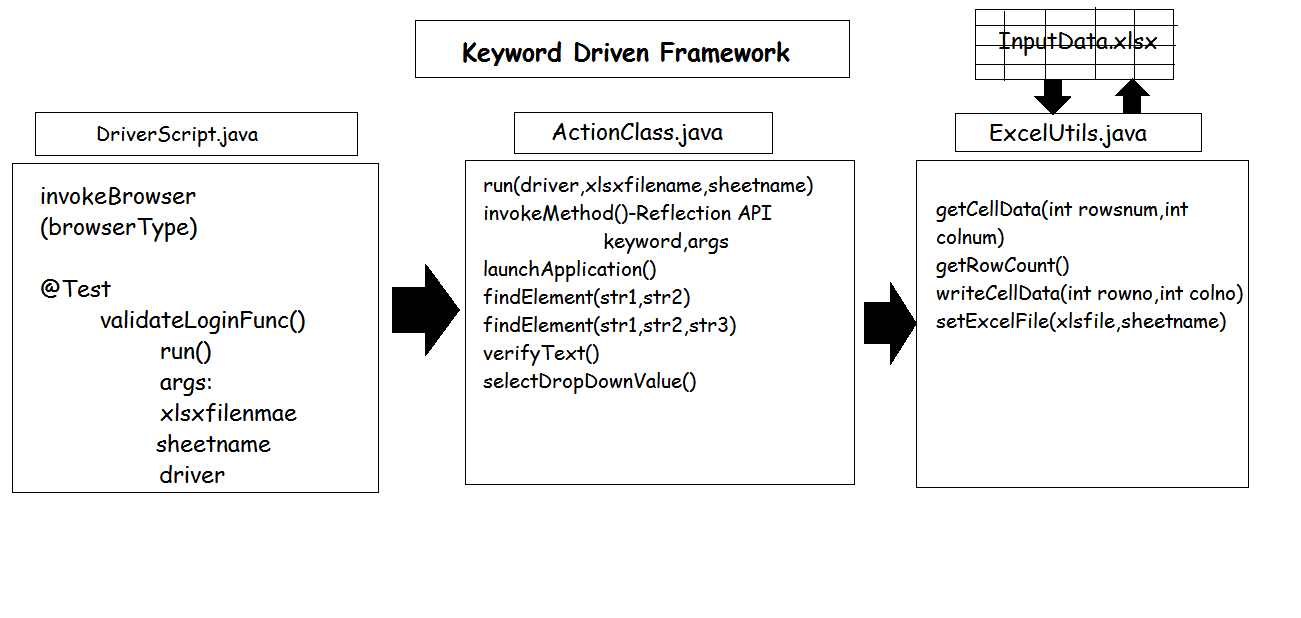
In this tutorial we are going to discuss about the implementation of Keyword Driven Framework. In Keyword Driven framework, you can create various keywords and associate function with each of these keywords. Then you create a Function Library that contains the logic to read the keywords and call the associated action.
Advantages:
The keyword and function libraries are completely generic and thus can be reused easily for different applications
All the complexity is added in the function libraries. Once the libraries are ready, it becomes very easy to write the actual test script steps in excel sheets.
Disadvantages:
Lot of time and effort needs to be spent initially to create the function libraries.
The benefits of the keyword driven framework are realized only after it has been used for longer periods of time.
Lets get into the implementation of the framework.
This framework is mainly implemented using the Reflection API where the method name is invoked based on the keyword passed in the XLSX file.
Pre-Requisites
Dependencies:

  • Selenium WebDriver
  • TestNG
  • Apache POI

KeywordDrivenFramework

KeywordDrivenFramework


Logic :DriverScript.java

Logic :ActionClass.java

Logic :ExcelUtils.java

Logic : testng.xml

Logic :inputData.xlsx
Github Link for xlsx file:
https://github.com/totalqa9/KeywordDrivenFwk.git

Conclusion:
Using the Logic mentioned above helps to implement the Keyword Driven Framework successfully in your projects.
Let us know if you have any queries in implementing this framework.
Drop an email to totalqa9@gmail.com

How to explain ExplicitWait in interviews?? Selenium WebDriver


Synchronization,Thread.sleep(time in millis),ImplicitWait
https://youtu.be/vtltAlKpyjs
ExplicitWait is mainly useful to apply wait on a single element.Synchronizing the state between the browser and its DOM, and your WebDriver script.This means that for as long as the condition returns a falsy value, it will keep trying and waiting.In order to achieve the ExplicitWait, we have to use a java class called WebDriverWait.

  • alert is present
  • element exists
  • element is visible
  • title contains
  • title is
  • visible text

File Upload Using Robot Class :

File upload in Selenium,Java,Robot Class


Video Link : https://youtu.be/UKUe0wpAN2k

Scenario 1:
Upload the TextFile and convert into PDF:C:\\SeleniumArtifacts\\ConvertTxttoPDF.txt
wait for visible Text

Scenario 2:
Upload the TextFile and convert into PDF : C:\\SeleniumArtifacts\\ConvertTxttoPDF.txt
Initial Title of the page : Zamzar – video converter, audio converter, image converter, eBook converter

wait for title is : Zamzar – File conversion progress

Scenario 3:
Upload the JarFile : C:\\SeleniumArtifacts\\SeleniumLatestVersion\\selenium-java-3.141.59\\client-combined-3.141.59.jar
wait for alert is Present

Scenario 4:
Upload the TextFile and Convert into PDF: C:\\SeleniumArtifacts\\ConvertTxttoPDF.txt
wait for element is visible :Download

Conclusion:
All the 4 Scenario’s will help to learn ExplicitWait.
We can use ExplicitWait in the programs to wait for a particular Element.

Interview Question Identify the Duplicate Items in the Listbox|HashMap|Selenium WebDriver


In Selenium WebDriver selecting a values from the Listbox is important based on the required input. In few scenario’s we need to validate the Listbox contains duplicate items are getting displayed as per the requirements. And also in interviews the mostly asked question is how to identify the duplicate values in the Listbox.
In order to automate this scenario, i have created a HTML webpage using the following html source code. Create a new File and copy the below contents of the html source into notepad and save the script in a file named ListboxEx.html. Access the HTML file and open in an browser to view the contents of the html page.

HTML SOURCE CODE

SELENIUM WEBDRIVER LOGIC:

CONCLUSION:
Using HashMap we can identify the duplicate option values in the Listbox
OUTPUT:
The size of the list is :: 5
Duplicate value in the List SELENIUM
The size of the hMAP :: 4
FAILED: validateDuplicateItemsInList
validate the list does not contain any duplicates
java.lang.AssertionError: expected [4] but found [5]