As a tester we are mainly interested in generating very good html reports to get to know the Test cases passed and failed. TestNG which is a java framework helps us in generation of index.html and emailable-report.html contains the information about the Test case Status. Even though it generates the status of the testcases we are mainly interested in taking screenshots,generation of PIE charts,LINE charts. In this tutorial we are doing to discuss on usage of Allure Framework to generate reports for different languages : JAVA,PYTHON,JAVASCRIPT,RUBY,GROOVY,PHP,DOT NET and SCALA.
GENERATE ALLURE REPORTING:
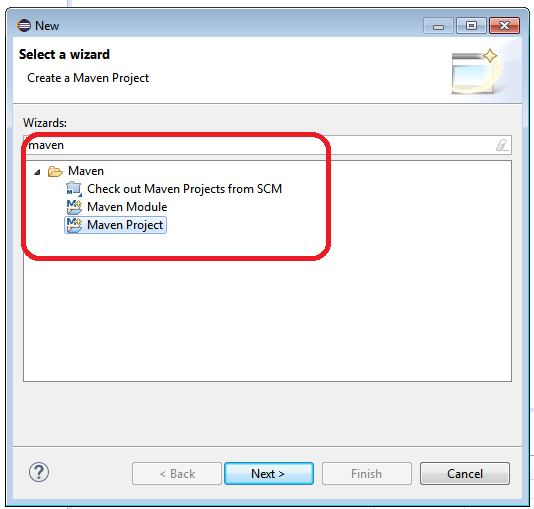
Create a Maven project
Subscribe to our YOUTUBE channel for more updates on automation videos
Project Source Tree Directory Structure:
The standard layout for Maven projects (the application sources reside in ${basedir}/src/main/java and test sources reside in ${basedir}/src/test/java, where ${basedir} represents the directory containing pom.xml).
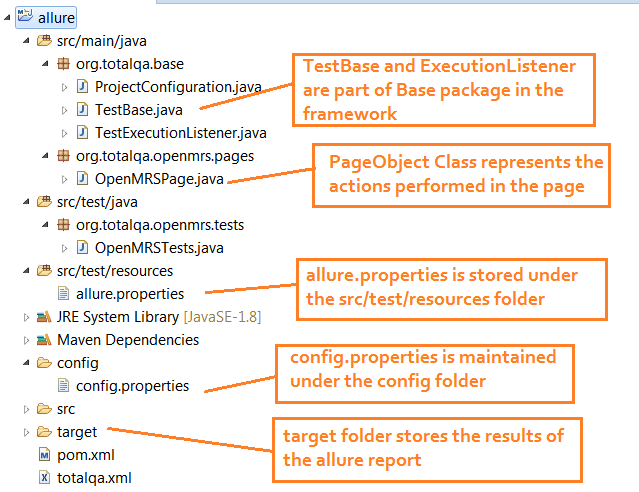
MavenDirectoryStructure-Allure configuration
Configuration for Allure: pom.xml
|
1 2 3 4 5 6 7 8 9 10 11 12 13 14 15 16 17 18 19 20 21 22 23 24 25 26 27 28 29 30 31 32 33 34 35 36 37 38 39 40 41 42 43 44 45 46 47 48 49 50 51 52 53 54 55 56 57 58 59 60 61 62 63 64 65 66 67 68 69 70 71 72 73 74 75 76 77 78 79 80 81 82 83 |
<project xmlns="http://maven.apache.org/POM/4.0.0" xmlns:xsi="http://www.w3.org/2001/XMLSchema-instance" xsi:schemaLocation="http://maven.apache.org/POM/4.0.0 http://maven.apache.org/xsd/maven-4.0.0.xsd"> <modelVersion>4.0.0</modelVersion> <groupId>org.totalqa</groupId> <artifactId>allure</artifactId> <version>0.0.1-SNAPSHOT</version> <packaging>jar</packaging> <name>allure</name> <url>http://maven.apache.org</url> <properties> <aspectj.version>1.8.10</aspectj.version> </properties> <build> <plugins> <plugin> <artifactId>maven-compiler-plugin</artifactId> <version>3.1</version> <configuration> <fork> true </fork> <executable>C:\Program Files\Java\jdk1.8.0_65\bin\javac.exe</executable> <source>1.8</source> <target>1.8</target> </configuration> </plugin> <plugin> <groupId>org.apache.maven.plugins</groupId> <artifactId>maven-surefire-plugin</artifactId> <version>2.20</version> <configuration> <suiteXmlFiles> <suiteXmlFile>totalqa.xml</suiteXmlFile> </suiteXmlFiles> <testFailureIgnore>true</testFailureIgnore> <argLine> -javaagent:"${settings.localRepository}/org/aspectj/aspectjweaver/${aspectj.version}/aspectjweaver-${aspectj.version}.jar" </argLine> </configuration> <dependencies> <dependency> <groupId>org.aspectj</groupId> <artifactId>aspectjweaver</artifactId> <version>${aspectj.version}</version> </dependency> </dependencies> </plugin> </plugins> </build> <dependencies> <dependency> <!-- https://mvnrepository.com/artifact/org.seleniumhq.selenium/selenium-java --> <groupId>org.seleniumhq.selenium</groupId> <artifactId>selenium-java</artifactId> <version>3.141.59</version> </dependency> <!-- https://mvnrepository.com/artifact/org.testng/testng --> <dependency> <groupId>org.testng</groupId> <artifactId>testng</artifactId> <version>6.14.3</version> </dependency> <!-- https://mvnrepository.com/artifact/io.github.bonigarcia/webdrivermanager --> <dependency> <groupId>io.github.bonigarcia</groupId> <artifactId>webdrivermanager</artifactId> <version>3.8.1</version> </dependency> <dependency> <groupId>io.qameta.allure</groupId> <artifactId>allure-testng</artifactId> <version>2.13.5</version> </dependency> </dependencies> <reporting> <excludeDefaults>true</excludeDefaults> <plugins> <plugin> <groupId>io.qameta.allure</groupId> <artifactId>allure-maven</artifactId> <version>2.10.0</version> </plugin> </plugins> </reporting> </project> |
Add the allure.properties under src/test/resources
|
1 2 3 |
allure.results.directory=target/allure-results allure.link.issue.pattern=https://example.org/issue/{} allure.link.tms.pattern=https://example.org/tms/{} |
TestExecutionListener.java
|
1 2 3 4 5 6 7 8 9 10 11 12 13 14 15 16 17 18 19 20 21 22 23 24 25 26 27 28 29 30 31 32 33 34 35 36 37 38 39 40 41 42 43 44 45 46 47 48 49 50 51 52 |
package org.totalqa.base; import org.openqa.selenium.OutputType; import org.openqa.selenium.TakesScreenshot; import org.openqa.selenium.WebDriver; import org.testng.ITestContext; import org.testng.ITestListener; import org.testng.ITestResult; import io.qameta.allure.Attachment; public class TestExecutionListener implements ITestListener { @Attachment(value = "Screenshot of {0}", type = "image/png") public byte[] saveScreenshot(String name, WebDriver driver) { return (byte[]) ((TakesScreenshot) driver).getScreenshotAs(OutputType.BYTES); } @Override public void onTestStart(ITestResult result) { // TODO Auto-generated method stub } @Override public void onTestSuccess(ITestResult result) { // TODO Auto-generated method stub } @Override public void onTestFailure(ITestResult result) { // TODO Auto-generated method stub saveScreenshot(result.getName(),TestBase.driver); } @Override public void onTestSkipped(ITestResult result) { // TODO Auto-generated method stub } @Override public void onTestFailedButWithinSuccessPercentage(ITestResult result) { // TODO Auto-generated method stub } @Override public void onStart(ITestContext context) { // TODO Auto-generated method stub } @Override public void onFinish(ITestContext context) { // TODO Auto-generated method stub } } |
OpenMRSTests.java
|
1 2 3 4 5 6 7 8 9 10 11 12 13 14 15 16 17 18 19 20 21 22 23 24 25 26 27 28 29 |
package org.totalqa.openmrs.tests; import org.testng.Assert; import org.testng.annotations.Listeners; import org.testng.annotations.Test; import org.totalqa.base.TestBase; import org.totalqa.base.TestExecutionListener; import org.totalqa.openmrs.pages.OpenMRSPage; import io.qameta.allure.Description; import io.qameta.allure.Severity; import io.qameta.allure.SeverityLevel; import io.qameta.allure.Story; @Listeners(TestExecutionListener.class) public class OpenMRSTests extends TestBase { @Description("Validate the Contents of Manage Service Types Tabular Data") @Severity(SeverityLevel.CRITICAL) @Story("US_001 OpenMRS ->Manage Service Types -> Tabular Data") @Test (description = "Validate the Tabular Data") public void validateTabularDateofServiceTypes() { OpenMRSPage mrsPage = new OpenMRSPage(driver); mrsPage.login(); mrsPage.navigatetoAppoinmentPage(); mrsPage.clickOnManageServiceTypes(); String actual = mrsPage.fetchTableRowContents(); String expected ="Dermatology"; Assert.assertEquals(actual, expected); } } |
OpenMRSPage.java
|
1 2 3 4 5 6 7 8 9 10 11 12 13 14 15 16 17 18 19 20 21 22 23 24 25 26 27 28 29 30 31 32 33 34 35 36 37 38 39 |
package org.totalqa.openmrs.pages; import org.openqa.selenium.By; import org.openqa.selenium.WebDriver; import org.openqa.selenium.WebElement; import io.qameta.allure.Step; public class OpenMRSPage { WebDriver driver; public OpenMRSPage(WebDriver driver) { this.driver = driver; } @Step("#1 Enter username and password and select InpatientWard") public void login() { driver.findElement(By.id("username")).sendKeys("Admin"); driver.findElement(By.id("password")).sendKeys("Admin123"); driver.findElement(By.id("Inpatient Ward")).click(); driver.findElement(By.id("loginButton")).click(); } @Step ("#2 Navigate to Schedule Appointment Page") public void navigatetoAppoinmentPage() { driver.findElement(By.id("appointmentschedulingui-homeAppLink-appointmentschedulingui-homeAppLink-extension")).click(); } @Step ("#3 Click on Manage Service Types") public void clickOnManageServiceTypes() { driver.findElement(By.id("appointmentschedulingui-manageAppointmentTypes-app")).click(); } @Step("#4 Fetch the first row contents of the manage service types") public String fetchTableRowContents() { WebElement e = driver.findElement(By.xpath("//table[@id='appointmentTypesTable']/tbody/tr[2]/td[1]")); String output = e.getText(); System.out.println("Output of the table content" + output); return output; } } |
TestBase.java
|
1 2 3 4 5 6 7 8 9 10 11 12 13 14 15 16 17 18 19 20 21 22 23 24 25 26 27 28 29 30 31 32 33 34 35 36 37 38 39 40 41 42 43 |
package org.totalqa.base; import java.util.Properties; import org.openqa.selenium.WebDriver; import org.openqa.selenium.chrome.ChromeDriver; import org.openqa.selenium.firefox.FirefoxDriver; import org.testng.annotations.BeforeClass; import org.testng.annotations.BeforeTest; import io.github.bonigarcia.wdm.WebDriverManager; public class TestBase { protected static WebDriver driver; protected Properties pro; @BeforeTest public void readConfig() throws Exception { ProjectConfiguration pConf = new ProjectConfiguration(); pro = pConf.loadProperites(); } @BeforeClass public void instantiateDriver() throws Exception{ System.out.println("First line of the instantiate method"); String browser = pro.getProperty("browser"); if(browser.equalsIgnoreCase("chrome")){ WebDriverManager.chromedriver().setup(); driver = new ChromeDriver(); } else if (browser.equalsIgnoreCase("firefox")){ WebDriverManager.firefoxdriver().setup(); driver = new FirefoxDriver(); } driver.manage().window().maximize(); driver.get( pro.getProperty("url")); System.out.println("LastLine of the instatiate method of TestBase"); } public static WebDriver getDriverInstance() { return driver; } } |
ProjectConfiguration.java
|
1 2 3 4 5 6 7 8 9 10 11 12 13 14 15 16 |
package org.totalqa.base; import java.io.File; import java.io.FileInputStream; import java.util.Properties; public class ProjectConfiguration { public Properties loadProperites() throws Exception{ Properties pro = new Properties(); String filePath = System.getProperty("user.dir")+"\\config\\config.properties"; System.out.println("Printing the file path from loadProperties method "+filePath); File src = new File(filePath); FileInputStream fis = new FileInputStream(src); pro.load(fis); return pro; } } |
totalqa.xml
|
1 2 3 4 5 6 7 8 9 |
<?xml version="1.0" encoding="UTF-8"?> <!DOCTYPE suite SYSTEM "http://testng.org/testng-1.0.dtd"> <suite name="OpenMRS Suite"> <test thread-count="5" name="Regression Tests"> <classes> <class name="org.totalqa.openmrs.tests.OpenMRSTests"/> </classes> </test> <!-- Test --> </suite> <!-- Suite --> |
Right Click on the project and select Run configuration
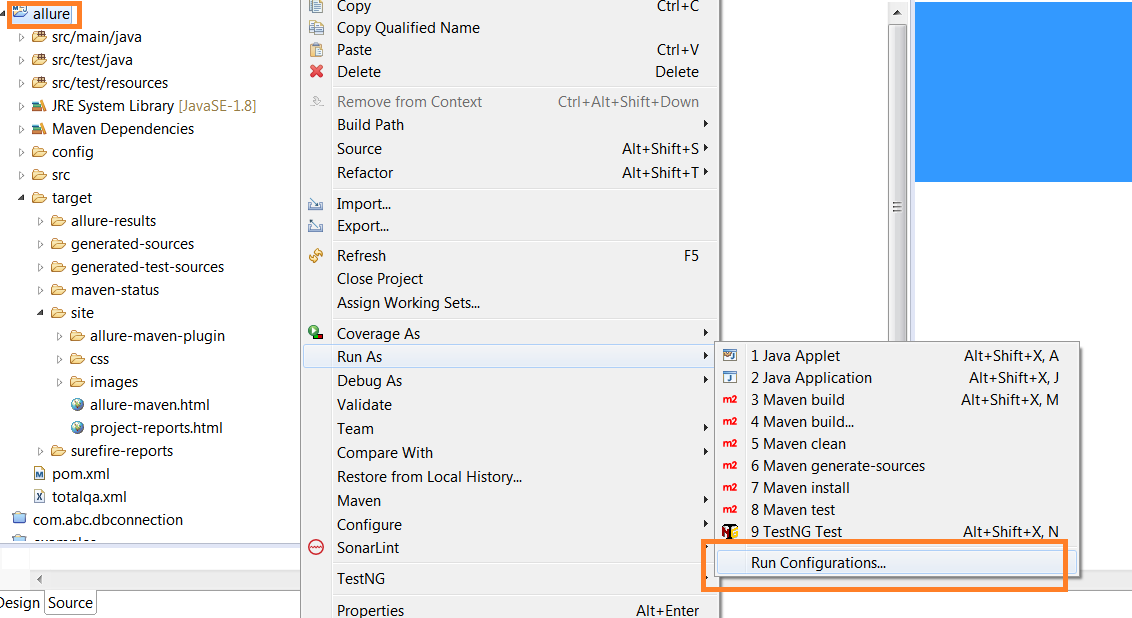
AllureConfiguration
Maven Goals as ‘site’
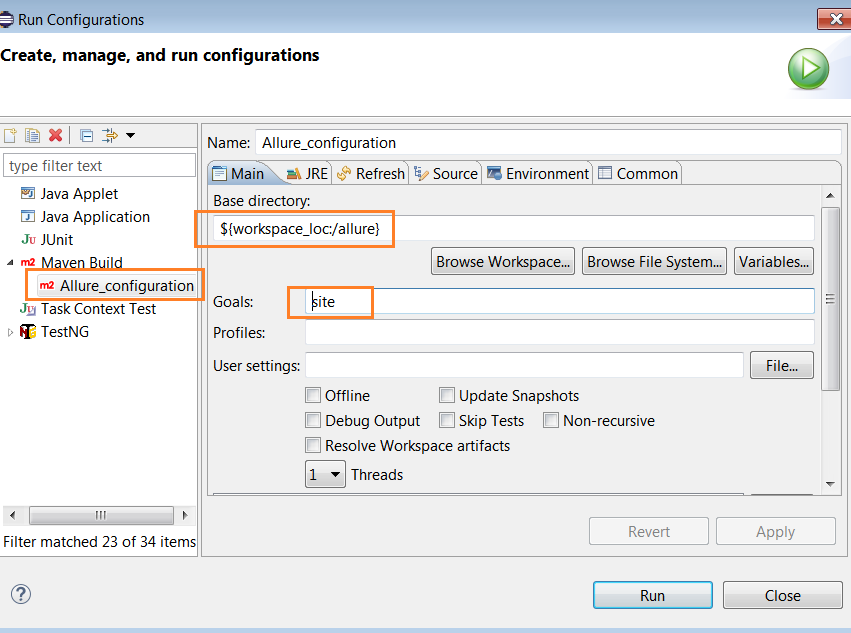
maven goals site
View the Reports in Firefox Brower only.
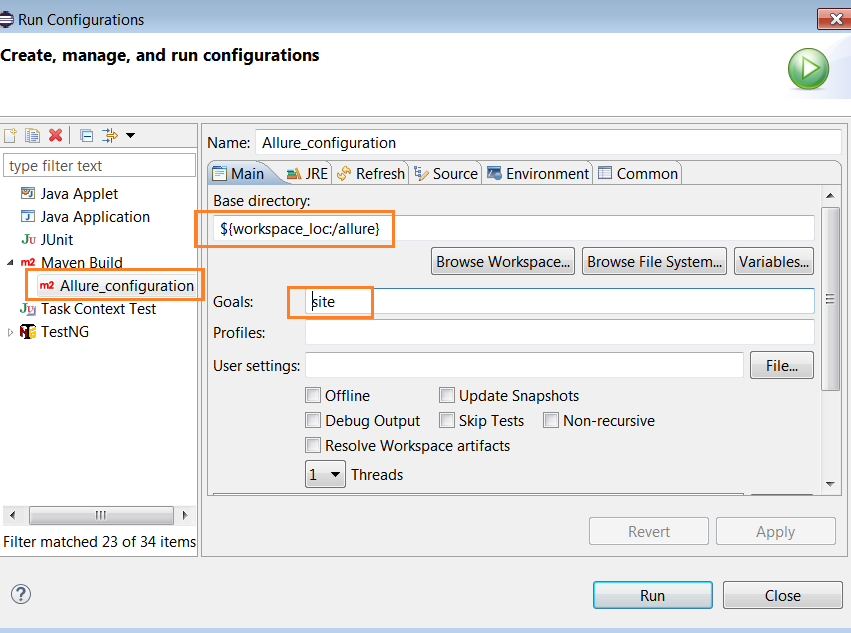
allure-maven.html
Finally, we are able to capture the allure reports as shown below:
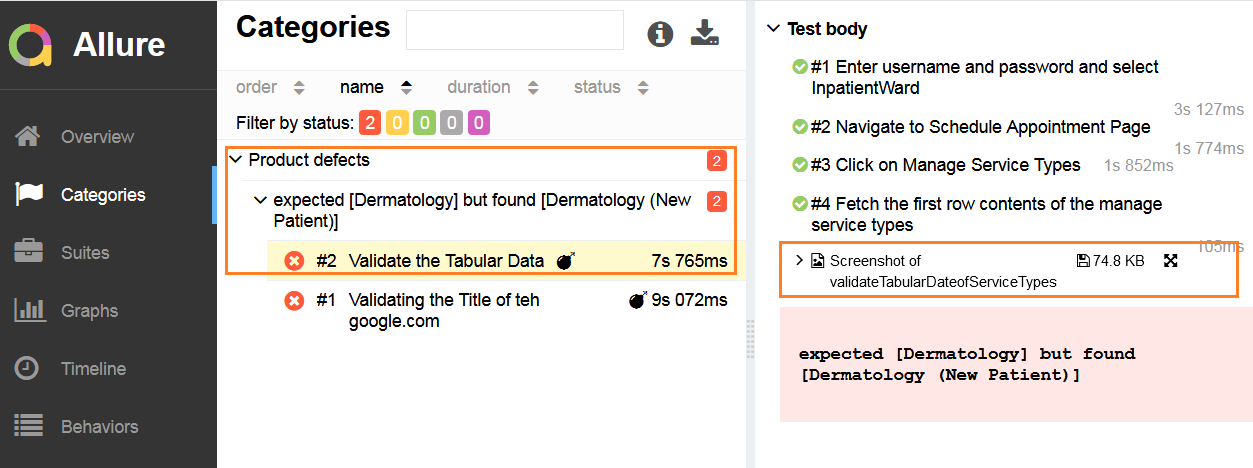
allure selenium report
History of Test Execution Results
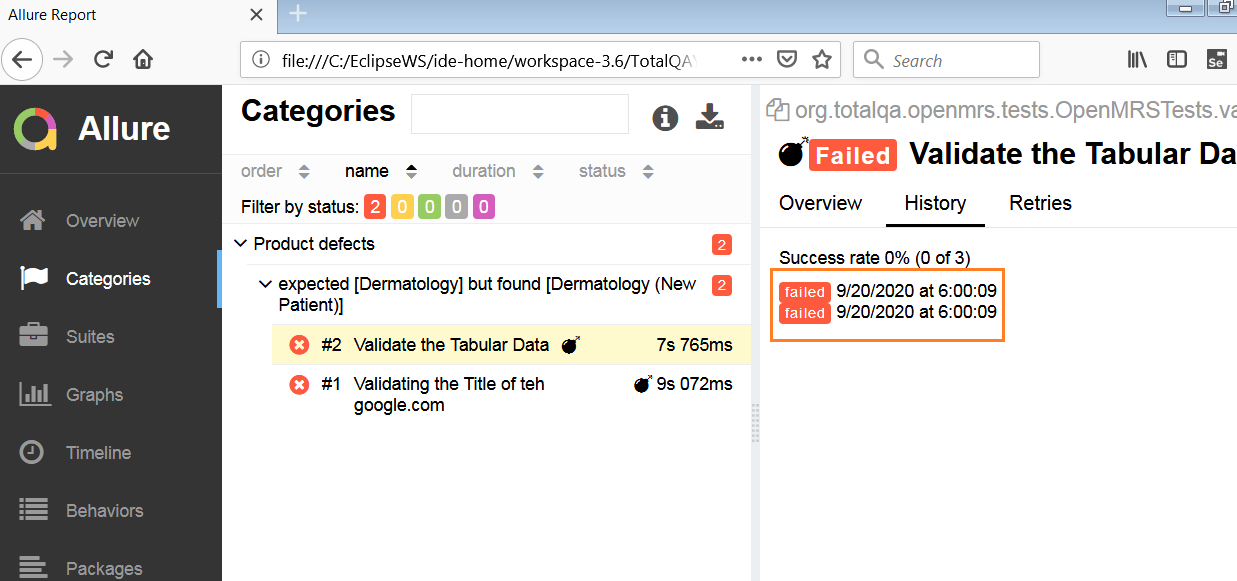
AllureReportHistory
Duration and Retries Trend
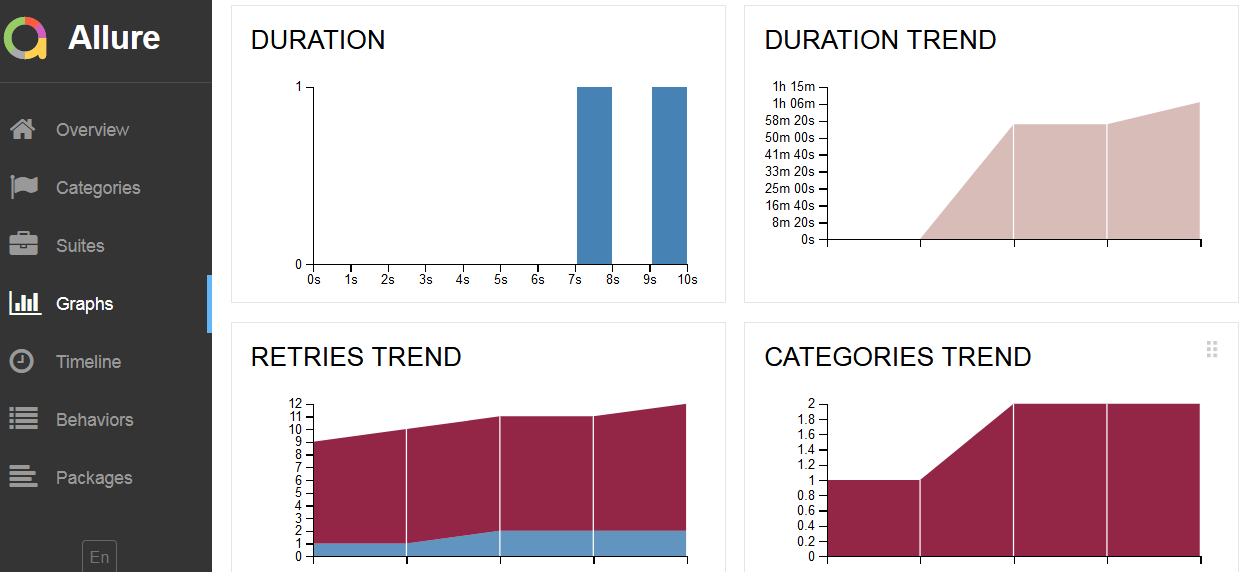
AllureGraphs